EqualizeOS Assistant
Plan and script with a local model or Claude
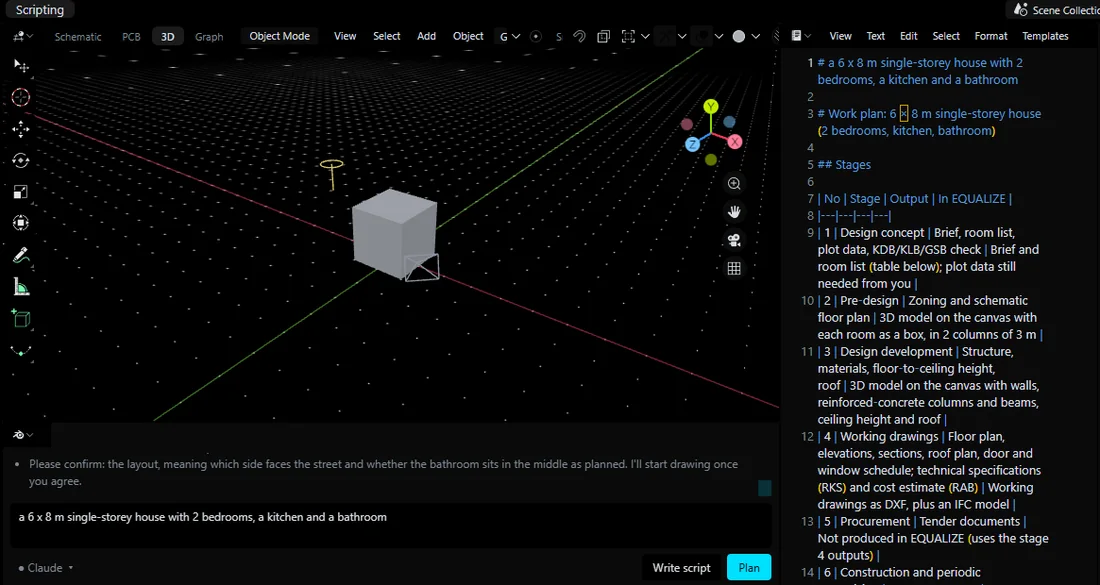
Type what you want to build under the 3D canvas. The Assistant writes a work plan first, then a Python script that uses the equalize API — and you press Run Script to draw it. Pick the model per task: one running on your own GPU, or Claude through your own Claude Code sign-in.
Plan → Write script → Run Script
A plan you can edit before anything is drawn
Plan returns stages and a room program as tables. The plan is saved as plans/<name>.md and opens in the Text Editor, so you can change it first.
Write script turns the approved plan into a Python script (eq.canvas.add_shape, eq.ifc.room, eq.ifc.door …). The script is a file you can read and edit. Nothing runs until you press Run Script.
- Shapes appear in the EqualizeOS 3D canvas and the Outliner
- Export IFC and Gambar Kerja buttons appear after a successful run
- Units are millimetres, Y is up — the same API Claude Code or Codex can call over MCP
Two model paths
Local model · AI provider
Open the model chip (▾) in the Assistant:
- Local model · this PC — an instruct model from Hugging Face (Qwen and others), downloaded in Models and run on your NVIDIA GPU. Offline, no quota.
- Claude — uses the Claude Code CLI you are already signed in to. It runs with no tools: it only returns text.
- EQUALIZE Agent — the EQUALIZE gateway.
- Same prompts and API reference for every path, so you can compare results.
Why two paths
Small local models are fast and private but write weaker plans. Claude writes stronger plans and scripts. EQUALIZE lets you choose per task instead of locking you to one.
No ModuleNotFoundError
Python libraries set up with one click
Local models need PyTorch and Transformers. EQUALIZE checks every Python on the PC and uses one that has them. If none does, you get a Set up card instead of a traceback: it installs the libraries into EQUALIZE's own Python runtime (PyTorch with CUDA when an NVIDIA GPU is present) and retries your action.
- Models › Runtime shows each pack — Local AI, BIM · IFC · CAD, Model training, Notebook kernel — and which Python serves it
- Installs only when you click; free disk space is checked first
Packs
Local AI: torch, transformers, accelerate, safetensors, psutil, huggingface_hub.
BIM · IFC · CAD: ifcopenshell, shapely, numpy.
Notebook kernel: ipykernel, jupyter_server.
FAQ
Questions about this feature
Can I use Claude instead of a local model?
Yes. Choose Claude in the Assistant model menu. EQUALIZE calls your own Claude Code sign-in with no tools, so Claude only writes the plan and the script text; you still review and press Run Script.
Which local models work?
Instruct models from Hugging Face that run with PyTorch and Transformers, for example Qwen2.5 and Qwen3. Download them in Models › Local agent. A 4B model runs on a 12 GB RTX 2060 with part of the layers in system RAM.
Does the AI change my project without asking?
No. The Assistant writes files (a plan and a script). Drawing happens only when you press Run Script, and agents that connect over MCP go through the same permission card.
Bring your AI. Keep the decision.
Free for Windows 10/11. Your AI account, your computer, your approval.