Codebase Index
Your agents search the code instead of reading all of it
EQUALIZE keeps one index of the open workspace and serves it to every agent: Claude Code, Codex and Kilo through MCP, the TensorEQ CLI, and local models. Fewer files read means fewer tokens and faster answers.
What is indexed
Symbols, signatures, imports and summaries
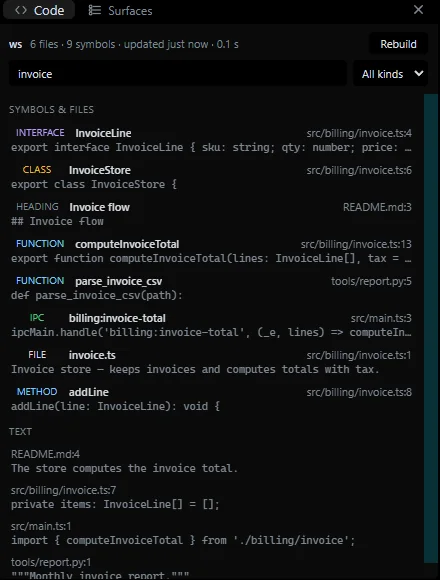
File list from Git, so .gitignore is respected. For every file: functions, classes, interfaces and types, methods, IPC channels, MCP tool names and Markdown headings — each with its line and signature — plus imports and the file's opening summary.
- Stored as
.tensoreq/code-index.jsonand refreshed incrementally — only changed files are read again - Measured on the EQUALIZE source: 1,524 files and 14,509 symbols in 2.5 s; refresh 0.6 s; search about 0.1 s
- The Index tab: search, click a result to open the file at that line, and see the map an agent receives
MCP tools
The same index for every agent
Read-only tools on the EQUALIZE MCP server, behind the same approval as every other tool:
equalize.code.map— a compact map: languages, manifests, most-imported files, folders with their exported symbolsequalize.code.search·definition·outline·refsequalize.graph.query— nodes, neighbours and import paths from the same index- TensorEQ CLI:
/map/find/def/outlineread it too
Start here
An agent that calls equalize.code.map first knows where things are before it opens a file — the difference between reading three files and reading thirty.
FAQ
Questions about this feature
Which agents can use the index?
Any MCP client connected to EQUALIZE — Claude Code, Codex, Kilo, Cursor — plus the TensorEQ CLI and the local model in EqualizeOS.
Does it upload my code?
No. The index is a file inside your workspace and it is served by EQUALIZE on your computer.
Bring your AI. Keep the decision.
Free for Windows 10/11. Your AI account, your computer, your approval.