Notebook Editor
A Colab-style notebook — on your own GPU
The EQUALIZE Notebook Editor runs a real Jupyter kernel on your computer. An AI model writes cells and fixes the ones that fail, a runtime panel shows RAM, GPU and disk, and secrets like HF_TOKEN stay encrypted.
Generate · Fix · Fix all & Run
Errors are marked, and fixed on request
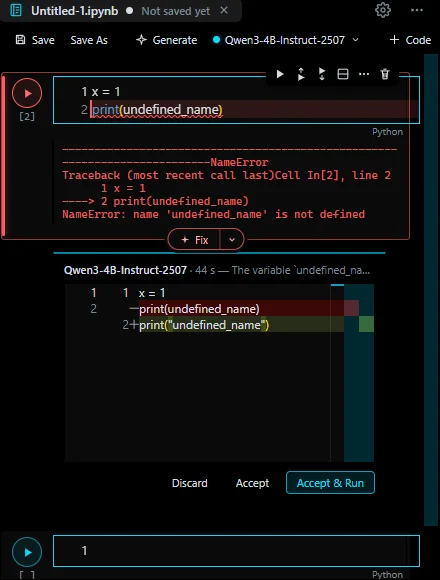
A failing cell gets a red outline and the failing line is underlined. A small Fix ▾ chip sits on the red border: the proposal appears as a diff under the cell — Discard · Accept · Accept & Run.
- Choose who fixes it: the local model, Claude or EQUALIZE Agent; if the local model cannot, Ask Claude is one click
- Fix all & Run runs every cell and repairs failures until all pass; every AI edit has an Undo
- A missing package becomes an
%pip installcell that you run — nothing installs behind your back - A large ▶ Run button on every cell; Ctrl+Enter and Shift+Enter; ■ interrupts
Runtime
CPU or GPU — measured, not guessed
RAM, GPU and disk meters sit in the toolbar. Resources shows system RAM and the kernel's own RAM, CPU load, GPU memory, utilisation and temperature, and the disk your runtime files use.
- Test performance multiplies matrices on the CPU and every GPU in the kernel — on an RTX 2060: 5.9 TFLOPS vs 73 GFLOPS on the CPU — and Auto uses the faster device
- Change runtime type: Auto, CPU only or a specific GPU, CPU thread limit, and the drive for temporary runtime files
- Stored in the notebook, like the accelerator setting in Colab
Secrets
Add keys in the Secrets panel (key icon). Values are encrypted by Windows and never shown again. A cell reads one with from equalize import userdata; userdata.get("HF_TOKEN") only while its Notebook access is on, and printed values are masked in outputs.
FAQ
Questions about this feature
Does the notebook use my NVIDIA GPU?
Yes, when the kernel's PyTorch has CUDA. Test performance measures CPU and GPU in the kernel itself and Auto picks the faster one; Change runtime type can also force CPU only or a specific GPU.
Where do I put my Hugging Face token?
In Secrets (the key icon in the notebook toolbar). Turn on Notebook access, then read it in a cell with userdata.get("HF_TOKEN"). huggingface_hub also sees it as HF_TOKEN.
Is it compatible with Jupyter?
Yes. Notebooks are standard .ipynb files and the kernel is ipykernel with jupyter_server on your machine, or a remote Jupyter server you add.
Bring your AI. Keep the decision.
Free for Windows 10/11. Your AI account, your computer, your approval.